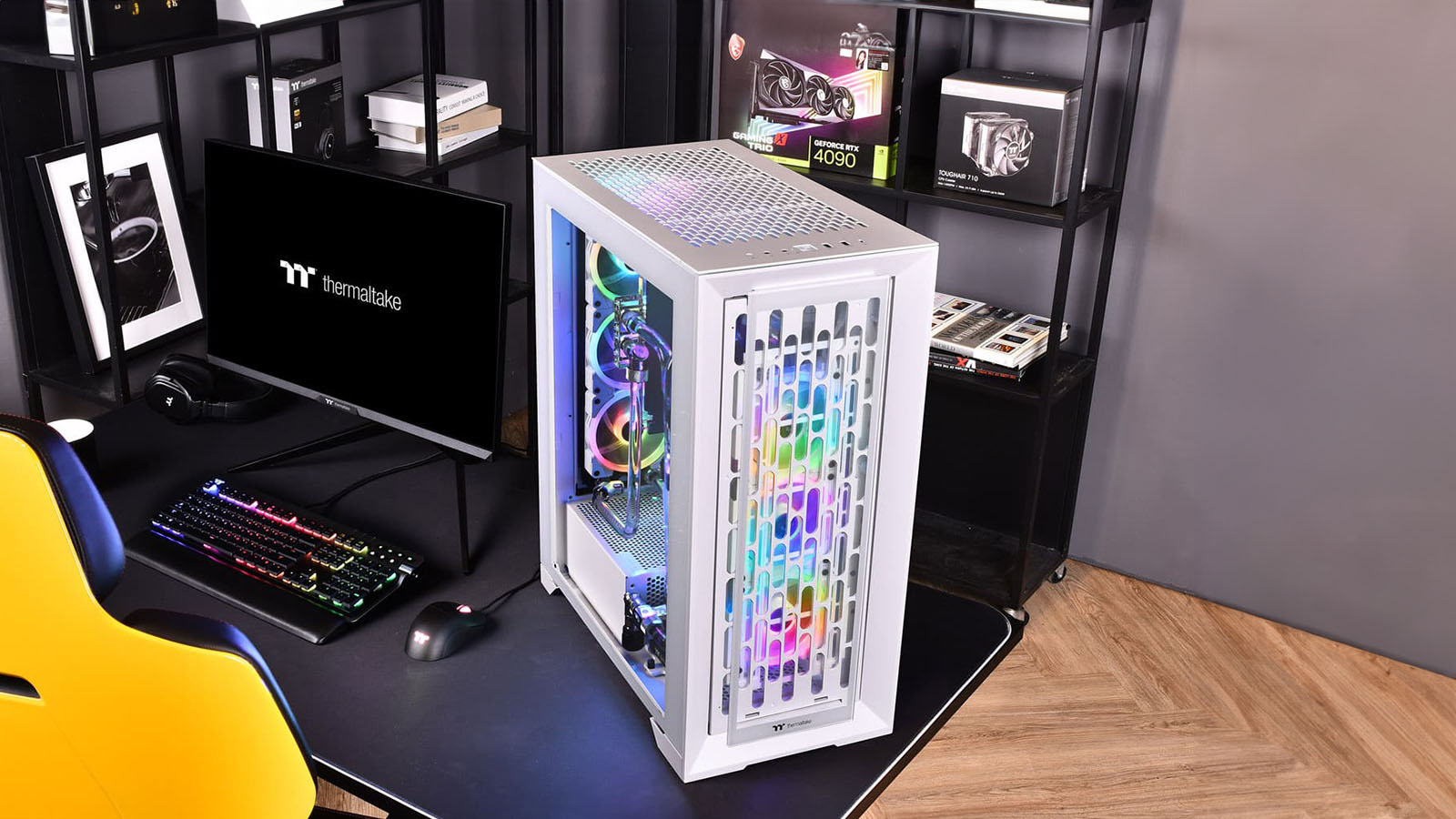
Yes, yes, Raspberry Pi’s are cool, and the 3D printed mini-cases you can make are even cooler. Yes, the Thermaltake Mini Core, or the good old Shuttle cases, are a marvel to look at and wonder how it’s even possible to fit a beast of a machine into such a small chassis. But man, I am glad that cases so big you need a forklift to carry them are back in fashion.
For me, a desktop PC is not just something that goes on top of a desk; it’s a piece of art. Whether it’s your style to have a fully transparent case, showing off all the inside bits, or a dirty, off-white 90s baby, it’s an expression of self, and you need a giant canvas for that self-expression.
The Thermaltake CTE T500 TG ARGB Full Tower Chassis is exactly that canvas because, holy smokes, it’s flipping huge.
Measuring in at a whopping 615 x 275 x 516 mm, the Thermaltake CTE T500 TG ARGB Full Tower Chassis is going to be taking up quite some table space, but with all that size comes a lot of room to play in and a large glass panel to show it all off. The chassis allows you to install a GPU up to 385mm long, a CPU cooler with a 195mm maximum height and a 180mm PSU with its own private compartment. It also can hold four 3.5-inch HDDs or up to 6x 2.5-inch drives. However, this changes depending on how many fans you install, as you’ll see later in this review. There are seven expansion slots, and you can fit in a combination of eleven fans and three radiators.
Yet, while it is quite the showpiece, the whole point behind this case design was to provide a better cooling experience for your internal hardware, and Thermaltake have come up with something a little different than what we’re used to in achieving this.

The most dramatic of all the changes Thermaltake has implemented is the mounting points for the motherboard. Thermaltake has decided that the board should be placed with the I/O ports on top of the case instead of at the rear, like every other case. My best bet is that the designer watched an old Cremora ad while coming up with the idea. Still, this design allows users to have two 360mm radiators blowing air directly onto their internal components. The cooling potential is fantastic, but it does mean there are a few things to get used to. For one, your cables will now plug into the top of your case. Thermaltake has a built-in Velcro strap to keep everything neat, but it does force the cables down the back of the case again. This adds about 15cm extra to your cable length requirement, so you might need longer cables or extension cables to fill the gap, especially for those notoriously short output cables that connect back to your monitor. Once everything is plugged in and with the cover panel back in place, it does look very clean; however, I do wish I was given the option to feed the cables out the side rather than only out the back, as it just allows for different placement options for the case on my desk. I like that Thermaltake has decided to take a risk by shaking things up. Yes, it’s very different to what we’re used to, but that’s how technology evolves.

Looking at the airflow of the case design, air enters from the rear, the bottom, the right side panel and the front of the case and gets blown out the top. Considering hot air rises, this is the optimal placement for these exhaust fans.
There’s also enough space inside the case for you to install your own custom loop system with a pump, and there are fan slots all over the case for more 120mm or 140mm fans to add even more airflow.
The thing is, the more fans you add, the less space you have for, well, the rest of your stuff.
A bunch of extra fan slots, barring the front and rear radiators, take up the space where you might fit some other components. For example, the fan space on the right-side panel takes up a hard drive/SSD Slot. The hard drive caddy at the bottom of the case goes where one might put their custom loop pump. Fitting two fans on the top of the case kind of gets in the way of the rear (now top) I/O ports to the ESXI slots on the motherboard, as the second fan is placed directly above the expansion slots, covering almost half of their length. While Thermaltake has left a small gap for you to access these slots, I still wouldn’t feel comfortable trying to connect any cable in the angled space provided.
Also, while I may just be nitpicking, I feel obliged to add that the dust covers for the chassis aren’t magnetic. I know that it’s just a tiny thing, but it feels a little more premium when they snap into place so nicely instead of jiggling them around to clip in.

I do like that the case comes with built-in Velcro straps for you to neatly tuck away all your cables, further amplifying the display aspect of your build, and, to get you started, the case comes standard with three of Thermaltake’s 140mm ARGB PWM fans, in either black or white depending on which colour-way you’ve opted for.
Looking at this case, the downsides, like fans taking up other component spots or the non-magnetic dust covers, can almost be ignored entirely. A chassis like this is not for any beginner PC builder hoping to buy it and throw whatever hardware they have into it. It’s for those who have thoroughly thought out their build and know precisely what will go where.
If you are one of those who think ahead, the Thermaltake CTE T500 TG ARGB Full Tower Chassis could easily be the focal point in any room. In fact, you might as well move your gaming room to the entrance hall of your house because everyone will want to stare at your build when they visit.
The positives far outweigh the negatives for this chassis. It comes bundled with three ARGB 140mm fans to get you started, has more space than you’ll ever need, and only costs R3,750. That’s a steal for a mammoth case this size.
Back that up with some pretty nifty cooling features, and you’ve got a rig that will keep you gaming pretty, no matter what heat wave Mother Earth throws at us.