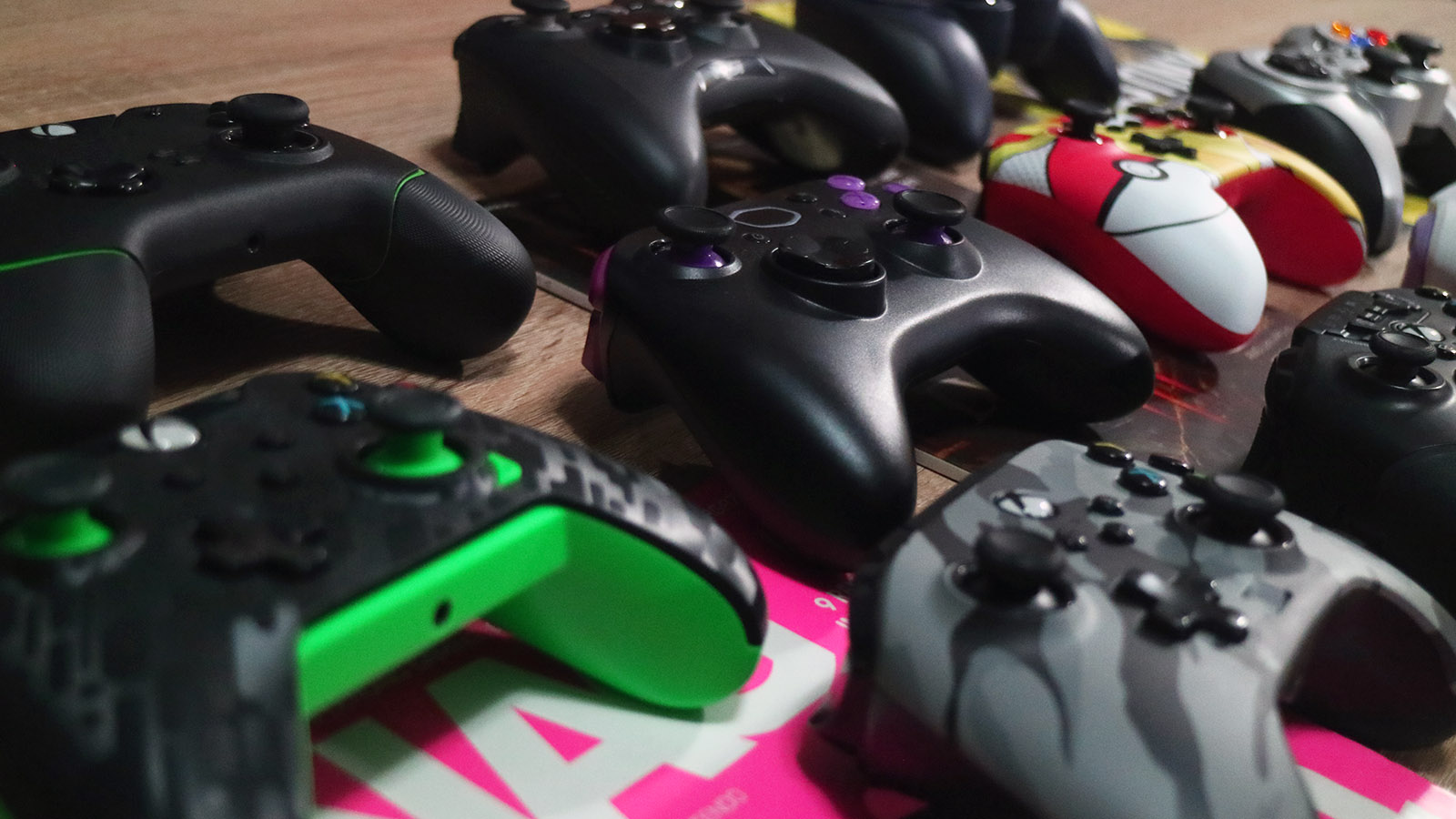
Some of the best ideas are born seemingly from nothing. The idea for gravity can be planted by witnessing a single apple fall from a tree, and the idea for a budget controller roundup can be set into motion just because two writers were excited to realise that they both use the same controller.
To preface this roundup, both of us are in the same age category, mouldy. When we started playing games, your choice was Mouse and Keyboard or using that old, sticky feeling controller you dug out of the junk draw.
This controller may or may not have come with analogue sticks, but the one thing that was a guarantee was that one of the buttons would stick when you pressed it too hard. Because of this, we’re both somewhat late to playing games with a controller, which inspired us to test the waters, see what was out there and take you along for the ride.
When we started talking about doing a controller roundup, we knew we wanted to look at affordable controllers. You’re guaranteed a great controller when you’ve got R3,000, R4,000, or R5,000 to spend.
However, when you start lowering the price point – that is no longer an absolute certainty, and there is nothing quite as disappointing as saving up for something, buying it and then having it not live up to your expectations.
But if you can find that one perfect controller, it feels a lot like pulling the sword from the stone and getting to experience PC games with the same level of comfort that consoles have been shelling for years now is something extraordinary.
Before you embark on this adventure with us, it should be noted that besides the controller we both started with, hereby known as the “control controller”, all the others were sent to us for review after being requested from various distributors.
Regarding the controller selection process for this list, there was little rhyme or reason outside of us wanting to make the comparisons as fair as possible.
To do this, we did what any elder millennial would do and headed to Google. From there, we considered one controller from each of the brands that are easy enough to pick up in South Africa and had a firm cut-off of R2,000.
While R2,000 is by no means a small amount of money, it’s a good upper limit for controllers in this hardware roundup as it gave us a good range of controllers to test.
Also, in terms of actual size, all the controllers we tested came in at roughly the same measurements – meaning they all fit in the same size category of “comfortable” with no drastic standouts in the group.
These controllers should easily fit most adult hands without feeling overly large or small.
So with that in mind, here are our honest thoughts about some of the best budget game controllers in South Africa and how each one measures up to the control controller, our beloved Turtle Beach Recon.
The Control Controller – Turtle Beach Recon

Turtle Beach Recon
Price: R1,499
Where can you get it: Evetech
Specifications
Size: 180mm x 183mm x 73mm
Interface: 3m Detachable USB-C Cable included in the Box
Weight: 300g
Compatible with: Xbox Series X|S, Xbox One & Windows 10 & 11 PCs
What’s in the box:
Inside the box, you get the controller, the 3m USB-A to USB-C cable to connect the controller to your device and some fancy paper manuals that you probably won’t read.
Pros:
- Great build quality
- Comfortable to hold
- Programmable back buttons
- Built-in audio and mic control right at your fingertips
- Competitive price
- It comes with a 3-meter-long USB cable
Cons:
- Wired – while this might not be seen as a con for everyone, it’s still worth noting
- Cody’s controller creaks when he uses it, sort of like the shell doesn’t fit perfectly
The Turtle Beach Recon controller is where we started this journey and what we both used as the control subject for this entire controller round-up. It’s a great controller with two programmable back buttons, built-in audio and microphone control. Considering its build quality, it comes at a competitive price and has a 3-meter-long USB cable.
It’s a great controller. Once you’re used to the two programmable buttons and can change your audio on the fly without putting down the controller, it’s hard to imagine leaving it for another controller, but that’s precisely what we set out to do.
We compared all the other controllers on this list to the Turtle Beach Recon to see how exactly they measure up and if any can steal our hearts and hands.
If you want to read our full review of the Turtle Beach Recon, you can follow the link here.
Our rigorous testing procedure involved using each controller for an extended playthrough of a game or games that we thought would work better on a controller than on a mouse and keyboard.
For Cody, this included a few action RPG titles such as Diablo IV and Knight Crawlers, and, while he prefers to play FPS games on Mouse and Keyboard, that’s just the old school way, he did try his hand at using the controllers for Apex Legends.
Arielle tested the controllers while playing and winning at Fall Guys, Layers of Fear, Diablo IV and Final Fantasy 16. During each playthrough, we weighed the comfort, features, quality and price, which all added to our opinion of each controller.
Subject One – PowerA Enhanced Controller Xbox

PowerA Enhanced Controller Xbox
Price: R899-R1,199 – depending on the colour
Where can you get it: Incredible Connection
Specifications
Size: 155mm x 110mm x 65mm
Interface: 3m Detachable Micro USB Cable, Included in the Box
Weight: 204g
Compatible with: Xbox Series X|S, Xbox One, Windows PC
What’s in the box:
Inside the box, you get the controller, the 3m USB-A to Micro USB cable to connect the controller to your device and some fancy paper manuals that you probably won’t read, again.
Pros:
- It’s much lighter than the official Xbox controller
- Programmable buttons
- Built-in volume slider
- Comfortable to hold
Cons:
- Wired – while this might not be seen as a con for everyone, it’s still worth noting
- Still uses micro USB instead of USB-C
- The D-pad and volume control knob both feel sort of mushy
Arielle’s opinion:
I wasn’t sure what to expect when I started playing around with the PowerA Enhanced Wireless Controller Xbox because it’s a brand that was previously not on my radar. However, after playing around with this bad boy, it’s a brand I’ll keep my eye on going forward.
In a nutshell, the PowerA Enhanced Xbox Controller has all the core features of the official Xbox controller but at a laughingly lower price point. But to make the deal even sweeter, the PowerA Enhanced Xbox Controller also comes with programmable buttons and a volume toggle, and once you’re used to having these little extras, it’s hard to go back. Trust me.
Cody’s opinion:
The PowerA Enhanced Xbox Controller really ticked a lot of boxes for me. It has the extra buttons that come in real-handy and it has a solid feel to it. I tend to prefer a heavier controller to a lighter one, so even though it was solid, for me it was a little light. The volume slider is also right where your thumb can reach it for easy access, which is handy if your partner suddenly starts asking you something while bombs are going off in your ear.
Does it stand up to current controller expectations?
Yes. Even though it’s only fractionally cheaper than the Turtle Beach Recon, it’s almost half the price of the official Xbox controller and other than the fact that it’s lighter and some of the buttons don’t feel the best; it feels well-built and performs almost as well as the official controller.
It also comes in various colour options and is fully compatible across both Xbox and PC.
Subject Two – PowerA Enhanced Controller Switch

PowerA Enhanced Controller Switch
Price: R999
Where can you get it: Takealot
Specifications
Size: 150mm x 110mm x 60mm
Interface: 3m Detachable USB-C Cable, Included in the Box
Weight: 130g
Compatible with: Nintendo Switch, Nintendo Switch OLED and PC
What’s in the box:
Inside the box, you get the controller, the 3m USB-A to Micro USB cable to connect the controller to your device and some fancy paper manuals that you still probably won’t read.
Pros:
- It comes in multiple different flavours, so there is sure to be a design to suit every type of gamer
- Build quality is pretty sturdy
- Good responsiveness
Cons:
- No rumble, none, not even a single little one
- Not that much cheaper than a first-party controller
- Way too light, which causes the whole controller to feel cheap and almost like a toy
- L2 and R2 are buttons, not triggers
Arielle’s opinion:
I struggled with this one because even though I wasn’t impressed with the controller, its look instantly captivated me. If I had to choose any controller on this list to join my collection purely as a display piece, this would be it. However, I don’t see myself ever using it. Returning to my regular controller after using this felt like a welcome homecoming.
While it’s true that the PowerA Enhanced Wireless Controller For Nintendo Switch is a cheaper version of Nintendo’s official full-sized controller, it’s missing out on so many of the core features of the original it’s a hard sell for me, even at the lower price.
Cody’s opinion:
There’s nothing that Arielle hasn’t said about this controller that I could add. Is it pretty to look at? Definitely, is it useful in any other way? Not even a little bit. There are other controllers on our list that are much better than the Nintendo Edition from the PowerA range.
Does it stand up to current controller expectations?
At its core, The PowerA Enhanced Wireless Controller is a stripped-down, bare-boned version of the official Nintendo Switch Pro controller. However, it doesn’t have the same heft behind it. Considering all the features you’re missing out on here, it would be better to save a little more to buy a controller that will last you much longer and offer you so much more.
Subject Three – PDP Neon Carbon

PDP Neon Carbon
Price: R949
Where can you get it: Evetech
Specifications
Size: 175mm x 175mm x 82mm
Interface: 2.4m Detachable Micro USB, Included in the Box
Weight: 360g
Compatible with: Xbox Series X|S, Xbox One & Windows 10 & 11 PCs
What’s in the box:
Inside the box, you get the controller, the 2.4m USB-A to Micro USB cable to connect the controller to your device and some fancy paper manuals that you probably won’t read. You also get a quick guide for the PDP Control Hub App, which lets you configure the buttons on the controller.
Pros:
- It’s got more weight to it than the PowerA making it feel like a more “official” controller
- Solid build quality
- Built-in audio controls
- Wide range of colour options available
Cons:
- The grips don’t have that nice, cushioned feel and, instead, feel very plasticky in your hands
- Wired – while this might not be seen as a con for everyone, it’s still worth noting
- Not compatible with Xbox One accessories that require an expansion port
- PDP controllers don’t have the best reputation for being long-lasting
Arielle’s opinion:
I struggled to review this controller in an unbiased way. I’m no stranger to using PDP controllers in my personal life, and I can’t say I’ve had the best experience with them in the long run. Sure, they’re always well-priced, feel mostly great and come with enough variety to make even the most picky of gamers happy. Still, they’re also known for developing drift, having buttons give in and losing all responsiveness quickly.
While I didn’t have any significant issues while playing with the PDP Neon Carbon controller, I also haven’t been able to see what it’s like, three or four months down the line and considering it’s the same price as the PowerA controller, that would be my personal preference – even though I prefer this controller’s look and weight.
Cody’s opinion:
I used this PDP after I used the PowerA Enhanced, and initially, I thought this controller was the better of the two. I prefer the colour options that come with the PDP to the PowerA and the increase in weight meant it felt better in my hands. However, after a few hours of gameplay, the grip started to show its true self. It became slippery in my hands and then a fight to hold, because of this I would opt for the PowerA for longer hours of game time.
Does it stand up to current controller expectations?
Having played with the PDP Neon Carbon for a short while, it seems like it packs a relatively good punch for the price. Still, looking at the bigger picture, it’s hard to look past the sins of PDP controllers passed and recommend it above the PowerA or the Turtle Beach Recon, even if it means saving up for a bit longer.
Subject Four – Turtle Beach React-R

Turtle Beach React-R
Price: R1,299
Where can you get it: Evetech
Specifications
Size: 155mm x 110mm x 63mm
Interface: 2.4m Detachable USB-C Cable, Included in the Box
Weight: 271g
Compatible with: Xbox Series X|S, Xbox One & Windows 10 & 11 PCs
What’s in the box:
Inside the box, you get the controller, the 2.4m USB-A to USB-C cable to connect the controller to your device and some fancy paper manuals that you probably won’t read.
Pros:
- Super responsive in-game
- On-the-fly paddle remapping
- The controller feels well weighted in your hand
- Solid build quality
- Shoulder buttons and paddles have a nice grip to them
Cons:
- The grips feel like they lack some rubberising. While it’s more comfortable than the PDP and PowerA controllers, it’s not as good as the Turtle Beach Recon controller
- Not that much cheaper than the Turtle Beach Recon controller
- Wired – while this might not be seen as a con for everyone, it’s still worth noting
Arielle’s opinion:
When I close my eyes and picture my ideal budget controller, the Turtle Beach React-R is precisely what I think of. For its price point, the controller looks and feels like a premium product, and thanks to the additional mappable paddle buttons and comfortable design, I instantly felt at home using it.
However, the Turtle Beach Recon feels like a far superior option for only a little more money that will last gamers just that much longer. Still, if the price is truly the deciding factor, gamers won’t go wrong with the Turtle Beach React-R, whether gaming on Xbox or PC or a combination of both.
Cody’s opinion:
The React-R can be seen as the little brother to the Recon. It’s got a good, solid build and it is very comfortable in your hands, although the added rubber grip on the Recon is missed. While this is probably the best controller for its price, the PowerA offers up a bit more colour options than the React-R, if that’s something that might sway you.
Does it stand up to current controller expectations?
Yes. The Turtle Beach React-R is an easy sell and the best bang for your buck compared to the other controllers that fit the same price bracket. The controller has everything you could want from a budget controller while still managing to feel good in your hands.
Would we choose it above our current Turtle Beach Recon controller? No. But would it be a great controller if we didn’t already have one? Yes, definitely.
Subject Five – Razer Wolverine V2

Razer Wolverine V2
Price: R1,998
Where can you get it: Takealot
Specifications
Size: 161mm x 105mm x 65mm
Interface: 3m Detachable Proprietary Cable
Weight: 274g
Compatible with: Xbox Series X|S, Xbox One & Windows 10 & 11 PCs
What’s in the box:
Inside the box, you get the controller, the required connection cable to connect the controller to the device and some fancy paper manuals that you probably won’t read. Also, this box is one of the only boxes I’d keep as it has more of a case feel than a box feel on the inside.
Pros:
- The controller has clicky mechanical buttons that sound and feel so lovely when pressed
- Comfortable to hold
- Well weighted
- Customisable buttons and adjustable triggers
- Super responsive across both Xbox and PC
Cons:
- Wired only with a non-removable cable
- The most expensive controller on this list
Arielle’s opinion:
I won’t even lie; if there is one controller on this list I can see myself using continuously, it’s the Razer Wolverine V2. There is nothing budget feeling about this controller, likely due to its higher price tag. It’s honestly hard to find fault with this controller because everything about it, from its mechanical buttons that are so pleasing to press and to listen to to the way it felt in my hand and its responsiveness in games – the Razer Wolverine V2 is undoubtedly in a league of its own.
However, at a price point of roughly R2,000, depending on where you buy, it’s more expensive than Microsoft’s Series X controller or the Sony DualSense, and it’s not wireless. In fact, not only is it not wireless, but the USB-A cable is non-removable. That said, if you can pick up the Razer Wolverine V2 on a sale, you’ll be getting a controller that’s right up there with the greats.
Cody’s opinion:
This is the best controller on the list, hands down. If I were to get any controller, I would save up and get this one. At first, the extra buttons felt like they were in the wrong position as most controllers put them at the bottom of the controller but the Wolverine puts them just next to the R1 and L1 buttons, once you start using the controller though they don’t feel out of place.
Obviously, the controller is the most expensive on the list so if you need something that fits your pocket a bit better this may not be the controller you land up getting, however, if you’re able to save up for just that little bit longer, then do it, you won’t regret it.
Does it stand up to current controller expectations?
Unfortunately, not only does it live up to our current expectations, it exceeds them. It’s hard to imagine returning to anything else, even briefly, after playing around with it.
Yes, the Razer Wolverine V2 is undeniably pricy. Still, the adjustable triggers and remappable buttons are on par with some of the high-end controllers, and so are the build quality and feel of the controller.
If you’re looking for a controller that won’t just be nice for now but will last you for years, you won’t go wrong with the Razer Wolverine V2. And if you wait for a sale, you might end up with one of the best controllers around.
Subject Six – Cooler Master Storm

Cooler Master Storm
Price: R899 (R999 with mobile mount)
Where can you get it: Cooler Master
Specifications
Size: 1610mm x 105mm x 61mm
Interface: 3m Detachable USB-C Cable and Bluetooth 5.0
Weight: 221g
Compatible with: Windows 10 & 11 PCs, Android and iOS Devices and OTT Bluetooth Devices
What’s in the box:
Inside the box, you get the controller, the 3m USB-A to USB-C cable to connect the controller to your device, and some fancy paper manuals that you probably won’t read.
Pros:
- Excellent battery life
- Lightweight and comfortable to hold
- Mobile mount
- Mouse mode when using it on a PC
Cons:
- The plastic housing feels cheap after holding it for a while
- No texturing or rubberised grips, which feels strange
Arielle’s opinion:
The Cooler Master Storm is Cooler Master’s debut controller, and what a great debut it is. Generally speaking, the controller is comfortable and lightweight in a way that doesn’t feel flimsy. The controller has the option to be used both wired and wirelessly over Bluetooth, meaning this is a controller that can be used for mobile devices as well as PC.
The battery life is also impressive, and with a promised 40 hours of battery per charge, there is little chance of the controller dying mid-fight. However, there are drawbacks in that there isn’t any support for consoles like PlayStation, Xbox, and Nintendo Switch, and it’s also one of the hardest controllers to find that we’ve featured on this list.
But if you’re looking for a controller to play mobile games with and still be able to use it for PC, look no further than the Cooler Master Storm.
Cody’s opinion:
The Cooler Master Storm is a great wireless controller with an even greater battery life. I love wireless things so I was very excited to give this one a spin. It performs quite well on PC and does an excellent job on mobile as well, but for longer play sessions it does start to get a little slippery, probably due to the lack of grip.
If you’re always travelling and trying to squeeze a few games on your laptop or phone in on your hotel time or while riding the train, I feel like the Storm could be your perfect travelling companion.
Does it stand up to current controller expectations?
While the wired/wireless option is a definite selling point, as well as its mobile compatibility, the fact that it doesn’t have console support and is so hard to find at the moment puts a definite damper on things and as much as we enjoyed our time with this one, it won’t be replacing our Turtle Beach Recon controllers anytime soon.
Subject Seven – Logitech F310

Logitech F310
Price: R499
Where can you get it: Logitech
Specifications
Size: 142mm x 144mm x 110mm
Interface: Non-detachable 1.8m USB Cable
Weight: 210g
Compatible with: Windows 7, 8, 10 & 11 PCs
What’s in the box: Inside the plastic blister pack, you get the controller and some fancy paper manuals that you won’t read.
Pros:
- It’s cheap
- DirectInput and XInput modes
- It will make you appreciate all other controllers
Cons:
- No rumble, none, not even a single little one
- It hurts to look at it
- The shape is so uncomfortable you might be tempted to look down, but don’t, don’t look it in the eyes
- Clunky analogue controls
- It looks like it feels sticky
Arielle’s opinion:
No. Just no. No one needs a controller so badly that they must settle for this visual abomination that looks like it came straight out of the nightmare realm. And suppose this horror doesn’t burn your eyes out when you look at it. In that case, it will undoubtedly cause you to grow protective calluses all over your hands to shield your soft human flesh from its rigid, unyielding plastic casing.
I’m sorry, but there is nothing good about this controller, and just because it’s cheap doesn’t mean you should buy it. Save your hands, your eyes and your mental well-being by waiting, saving, and purchasing any other controller on this list, or just making do without a controller because that’s fine too.
Cody’s opinion:
I can’t really understand why Logitech has decided to stick with this design for so many years. The trigger compartments get in the way of where my knuckles need to be and because I have to shift my hands around I couldn’t really get a nice grip on the controller. Does it work? Yes, it works, but so did the Fiat Multipla and we’ve luckily left that thing in the past, where it belongs.
There’s absolutely nothing about it that should drive you to want to buy it, the only feature it has is the Direct and XInput Mode Toggle, don’t let the price tempt you. Logitech, just, why?
Does it stand up to current controller expectations?
No.
Subject Eight – Logitech F710

Logitech F710
Price: R850
Where can you get it: Logitech
Specifications
Size: 142mm x 144mm x 110mm
Interface: Wireless Nano USB Receiver
Weight: 285g (with batteries)
Compatible with: Xbox Series X|S, Xbox One & Windows 10 & 11 PCs
What’s in the box: Inside the plastic blister pack, you get the controller, the USB receiver and 2x AA batteries inside the controller. You also get some fancy paper manuals.
Pros:
- If you don’t plan to use it to captain a submarine, you should be okay
- If you were always Player 2 growing up, you might feel a sense of nostalgia for this design
- Wireless with replaceable batteries
Cons:
- It almost definitely sank a submarine, singly handily
- It’s so uncomfortable you’ll wish you were in a submarine instead of using it
- Had some connection issues
Arielle’s opinion:
You know when you were a kid, and you’d go with your parents to visit their friends, and your parents would make you play with their friend’s kid? Then that kid would take you into a room that smelled a little like mothballs, but they’d have a console, and that would make everything alright, but then that kid would pass you the dreaded Player 2 controller. A controller was so dirty that no amount of Bleach in the world could save it, and when you touched it, your hands remained sticky for the rest of the night, no matter how many times you washed them. No? Just me?
Well, that image flashes across my mind when presented with this abomination of a controller. I hope Cody has something better to say because, as far as I’m concerned, it’s a resounding no.
Cody’s opinion:
I’ll say this, at least it’s more comfortable than the F310 because of its rubber grip. The added rumble motors do make it heftier in your hand, but you wouldn’t hold it for too long because the shape was designed back in the 90s when only kids with small hands played games. I still can’t understand why Logitech of all companies have kept with this design. It baffles me every time I look at these controllers.
Does it stand up to current controller expectations?
Based on how uncomfortable it is to hold, it’s impossible to recommend or choose above any other controllers. For the same price, many other controllers are available that give you more features, are more refined, look good and feel great.
Subject Nine – MSI GC30 V2

MSI GC30 V2
Price: R800
Where can you get it: TVR Distribution
Specifications
Size: 157mm x 105mm x 62mm
Interface: Wireless Nano USB Receiver
Weight: 280g
Compatible with: Xbox Series X|S, Xbox One, Windows 10 & 11 PCs, PS4, Android and iOS
What’s in the box: Inside the box, you get the controller, the USB receiver, a Micro USB charging cable and an OTG (On-the-go) cable to connect the receiver to your Android device.
Pros:
- Usable on several platforms, including mobile
- Decent battery
- Wireless
- Comfortable
- Interchangeable D-Pad
Cons:
- It needs a bit of refinement in the design, as it can be annoying for gamers with bigger hands
- Still uses micro USB instead of USB-C
- Analogue sticks need calibration
Arielle’s opinion:
When it comes to game controllers, there are a lot of boxes I want it to check. Still, the reality is, some users aren’t looking for a controller to help them git gid in Call of Duty, and instead, all they want is a controller that’s easy to use, that they can use regardless of platform and that comes at a decent price point – everything that the MSI Force GC30 offers, in spades.
While I’m not convinced that I’d switch from my current controller to this one, it is a controller that I’ll keep in mind to recommend to casual gamers and mobile gamers alike.
Cody’s opinion:
I was pleasantly surprised by the MSI GC30 V2, it may have been because it was reviewed after the Logitech controllers and I had lost all hope, but I’m glad the GC30 performed as well as it did. It is wireless, which I love, and it does have a comfortable feel to it. Yes, it feels a little smaller than the “Xbox” design which is quite common these days, but I didn’t have an issue with it on my end. (Now we all know who has bigger hands).
The build quality is great and the controller is solid, sturdy and has a good weight to it. I like that you can opt for a traditional D-Pad or swap it out for the omnidirectional pad if you prefer. It does lack features like extra buttons, but if you’re just looking for something to jump right into gaming, the MSI GC30 V2 is perfect.
Does it stand up to current controller expectations?
Yes, it does, and even though the lack of extra buttons doesn’t do the controller any favours, the excellent price point combined with its cross-compatibility and wireless functionality more than makeup for any shortcomings.
Now that you’ve reached this far, it’s time for us to enthral you one last time with our final thoughts and verdicts. If this was Street Fighter and all the controllers mentioned were fighters, here are the ones that we would crown victorious.
Best Wireless Controller:
This award goes to the MSI GC30 V2. While we didn’t like the limitations on buttons, the controller is so well-priced and easy to pick up and use that it’s hard not to fall in love with it. Overall it’s well made, feels good, has a decent battery life and is a pleasure to use.
Best Controller On A Budget:
This award is one that we couldn’t agree on, so our two picks will have to suck it up, play nice and accept the recognition together.
At R899-R1,199 – depending on the colour, Cody fell for the PowerA Enhanced Wireless Controller Xbox. The controller feels well-built and performs almost as well as the official Xbox controller for nearly half the price.
On the other hand, Arielle thought that R999 for the Turtle Beach React-R is money well spent. The controller has everything you could want from a budget controller while still managing to feel good in your hands.
And finally, what you’ve all been waiting for, our ultimate controller champion! The one controller to rule all others is…
The Razer Wolverine V2
NAG EDITORS CHOICE
And no, it’s not just because it shares a name with our favourite member of the X-Men.
While the Razer Wolverine V2 is undeniably pricy compared to the other controllers on this list, it’s one you won’t go wrong with getting, even if you need to wait for a sale.
The adjustable triggers and remappable buttons are on par with some of the high-end controllers, and so are the controller’s build quality and feel, making it hard to imagine returning to anything else, even briefly, after playing around with it. – © 2023 NAG.co.za
And that’s a wrap. Did you enjoy this budget controller round-up, and if so let us know in the comments.
Now if you’ll excuse us, we have some games to play and controllers to play them with.