
For most of us, gaming notebooks are an almost impossible extravagance – with more or less the same specs as a high-performance desktop PC at about three times the price, the excuse that “it’s portable, you guys” is probably not going to be a compelling reason for your family to eat out of dumpsters for the next six months. Starting at R39,999, the ASUS ROG Zephyrus is no exception to the dreary necessities of responsible budgeting, but… is food actually that important? You don’t even have to eat out of a dumpster if you quit eating entirely. That’s, like, basic logic.
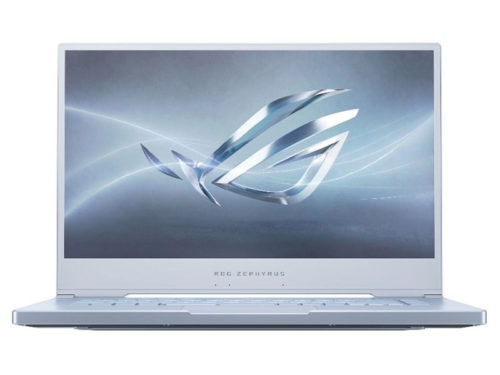
From an aesthetic perspective, the Zephyrus is instantly mega-impressive. The review unit I got from Asus is the new “glacier blue” model, with a magnesium alloy chassis and an unconventional grey-silver matte, subtle glitter finish that complements its unicorn sparkle dream RGB lights. A mesh strip above the keyboard adds some futuristic glam, and the screen features a super-skinny bezel. Sexy.
Powered by Nvidia’s GeForce 2070 at 240Hz with Pantone-validated colour space and a max resolution of 1920 x 1080 pixels (or up to 4K on an external monitor or TV via HDMI), this machine’s vivid display and extraordinary visual performance isn’t limited to fun and games, and makes a very decent option for graphic design or video editing – although you’d probably bump up the RAM from 16GB to 32GB for those apps. The Zephyrus also includes a mux switch to disable the GPU to save power when you’re unplugged, and according to the marketing blurb, can go for up to eight hours on battery. Obviously, however, this time is reduced depending on what you’re doing. I clocked an estimated time of 90 minutes or so with Age of Empires: Definitive Edition, for example, which isn’t even the most graphics- or resource-intensive game. You can boost this with one of Asus’s sold-separately USB power packs, but I dunno if these are available locally.
Also, the Zephyrus runs hot. Like, hot-hot. Despite multiple air vents on the back and sides and built-in fans, even the top of the keyboard was heating up significantly under system load. If you plan to have kids in the future, I’d recommend using a desk or laptop stand to keep your junk at optimum reproductive operating temperatures. Or boil them. Whatever. I’m pro-choice like that.

Audio is okay. I mean, it’s a notebook so manage your expectations proportionately, but at lower volumes, the 2.5W stereo mini-cones are adequate enough. For gaming or music, though, you’ll want to use real speakers or headphones.
The keyboard is also okay, but that’s very much a subjective thing. I’m left-handed and prefer keyboards with a numpad for games because WASD controls are kind of awkward for me. Four dedicated multimedia hotkeys add some extra versatility, but the position of these at the top left makes them inconvenient for the same reason. For typing or other stuff, this keyboard is responsive and comfy, with a slippy plastic coating and minimal travel distance. The font is rad too.
Much like the keyboard, the connections present some problems for lefties, with most of the important ports (power, ethernet, audio and mic jacks, DisplayPort, and HDMI) on the wrong side, if – like me – you’re using a mouse, and who even uses the trackpad anyway. This is more or less standard edition for notebooks, but it sucks and how is it that in 2019 we haven’t invented USB hubs for this. I’M NOT MAD, YOU’RE MAD. And besides, the Zephyrus makes up for this with support for two external monitors for my ADHD.
Perhaps controversially, Asus has decided to nuke the webcam on the Zephyrus. I guess a lot of streamers use a discrete camera for the improved fidelity, but for everybody else, videophoning granny on the Skypes is out. Maybe that’s not such a bad prospect.