Over the last couple of years, handheld gaming has been blowing up in a way unlike anything we’ve seen before. What started as a great way to play your favourite Nintendo titles has morphed and evolved into a world where brands like PlayStation, Valve, MSI, Asus and even Lenovo all have their own handhelds.
Because of the sheer number of handheld devices available, picking the right one for you is no longer the most cut-and-dry feat—which is precisely where we come in. Over the last while, we’ve been setting out to test out, play on, and review all the latest and greatest handhelds so you know what to look out for, bringing me back to the Lenovo Legion Go.
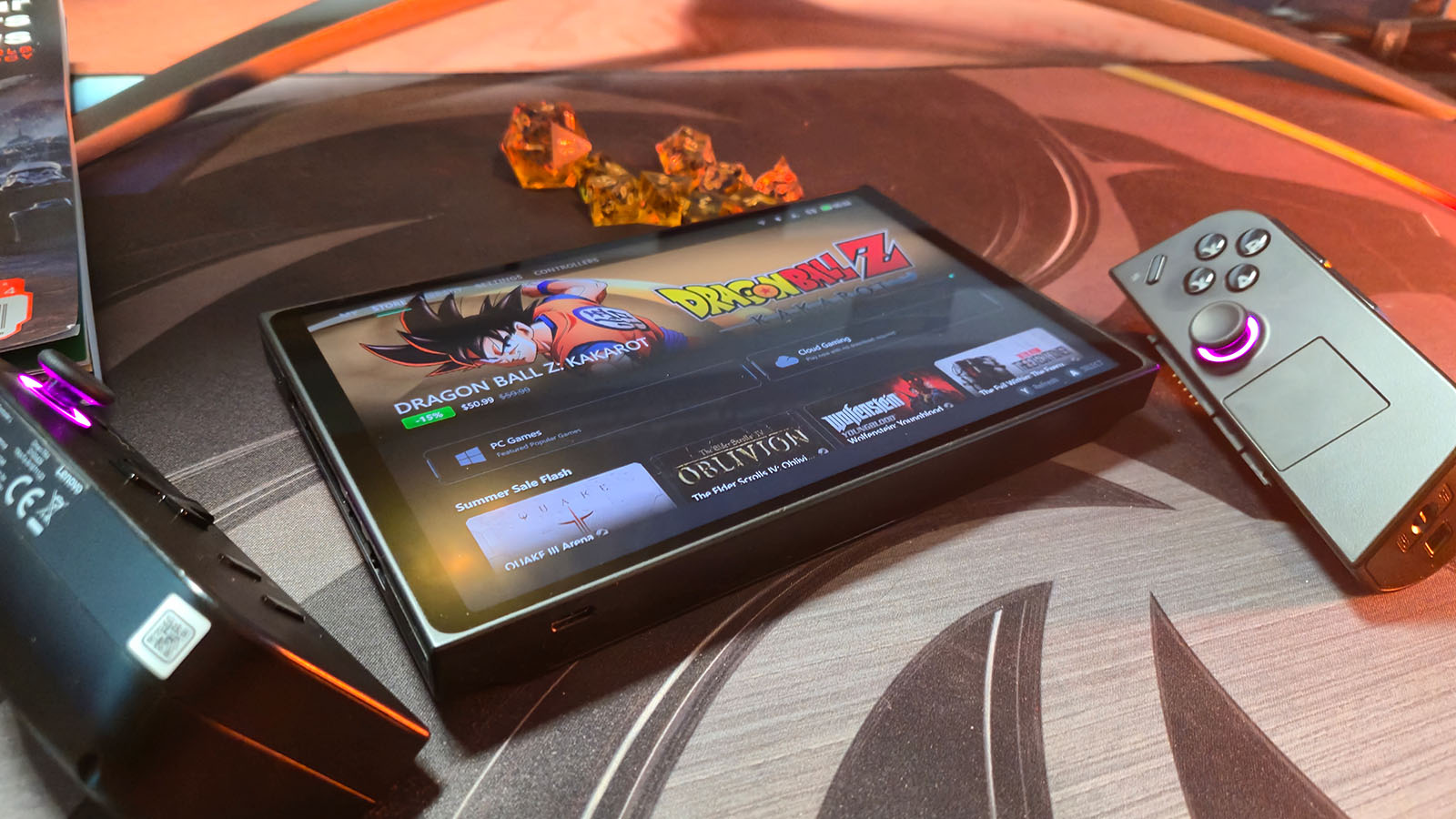
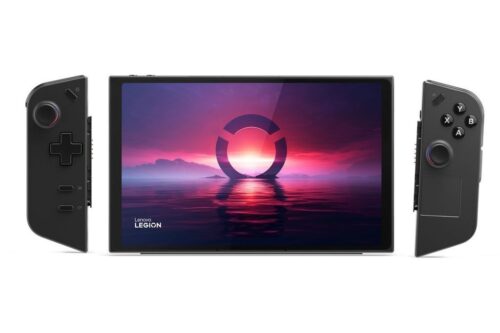
In short, the Lenovo Legion Go is one of the most impressive handhelds I’ve used so far, and in a world filled with some really sick devices, that’s saying a lot. From the moment you take the Legion Go out of the box, you’re greeted with an absolutely gigantic 8.8-inch glossy touchscreen, which is every bit as big, vibrant, and responsive as gamers could possibly want from a handheld.
At its core, the Legion Go feels a lot like a Windows tablet with a pair of detachable Nintendo Switch-like wireless controllers—although, unlike Nintendo’s Joy-Cons, the Go’s controllers have drift-resistant Hall effect joysticks. Oh, and one of them can transform into a vertical mouse with the flick of a switch.
The Legion Go also has two USB-C ports, each with 40Gbps of USB4 bandwidth. This allows you to plug in a keyboard, SSD, or even a Thunderbolt 3 external GPU without removing your charger, which is a nice touch.
The device also gives the impression of having an edge-to-edge screen, even though the reality is that the screen itself doesn’t entirely extend out to the entire glossy layer on top, it’s still a screen to be reckoned with, and gaming on it feels so much more engaging than it does on any of the other handhelds I’ve tried before.

Now, alongside Legion Go’s glorious screen comes the very stark fact that to deliver the biggest screen on a handheld to date, the device is both big and heavy—which means that it is a device best suited to giving you the freedom to game from anywhere inside your own home, instead of pulling it out while you’re standing in the queue at the bank, say.
But take that with a grain of salt because I used to regularly up and move my entire PC to play games with friends, so the idea of moaning about the size of a handheld feels ridiculous. However, it is still worth noting that it isn’t the smallest or lightest device to throw into a bag when on the move.
In fact, the Lenovo Legion Go weighs a whopping 854 grams, and while I was initially sure that its weight would be a deal breaker for me, the device is actually really well-balanced. Although I’d be lying if I said it felt weightless in my hand, you get used to it quickly, and it wasn’t the issue I initially thought it might be.
While the large screen size was the immediate draw for me and one of the core reasons it’s my favourite handheld to date, the Legion Go boasts another standout feature: its Nintendo Switch-esque detachable controllers.
At any point, users can hold down a button and pull down to detach both controllers, giving them more flexibility when it comes to gaming. The other standout feature is that the right-hand controller can turn into a makeshift mouse—something the device intended to make playing FPS games on the Lenovo Legion Go a possibility.

If you detach the controller and rotate it 90 degrees to the left, there are extra buttons that line up with your fingertips and thumb to give you a five-button vertical mouse, complete with a 1,800 DPI optical mouse sensor on the Teflon-coated bottom and a tiny scroll wheel around the back.
Now, I’ll be honest; the whole FPS thing felt very gimmicky to me. It’s cool to experience and cool to show off to friends, and it does work, but in reality, it just never clicked for me when it came to actual gaming. I still feel that the way to go is to use the standard controller setup or connect a Bluetooth mouse.
However, if you ever find yourself in need of a mouse and don’t have one, using the controller in FPS mode is definitely superior to prodding at the screen with your fingers—but it’s just not the way I would choose to play my games.
However, that’s not to say that I didn’t really enjoy the Legion Go’s detachable controllers because I did. Especially when it came to using the device’s kickstand to keep it upright on a desk. I could then settle back and genuinely relax with my favourite games without holding the device with sweaty palms for prolonged periods.
Also, not to mention the screen again, but it makes gaming at a distance pleasant, and I never felt like I needed to squint to see the screen.

Talking about games, as with all the other handhelds on the market, where they truly come into their own and shine to their full potential is when playing Indie games. However, that’s not to say those are the only games the Legion Go can support. The Legion Go packs quite a punch thanks to AMD’s Ryzen Z1 Extreme mobile chip and RDNA 3 GPU featuring 12 compute units.
Playing something like Marvel’s Spider-Man at 1920×1200 on low settings will get you around 40 FPS, but something older like Doom Eternal or smaller Dungeons of Hinterberg will net you about 144 FPS on high.
The device also has a couple of modes to help you get the best out of the experience. First up, there’s the much-need power-saving mode (and trust me, if you want to play on your device while it’s not plugged into the wall, this mode is a must), and then there is also Performance mode, which will make the devices fans whirr when playing bigger titles but will also make everything feel nice and silky smooth – at the cost of battery life, but that’s why I say, use this when plugged in.
But even when trying to conserve the Legion Go’s 49.2Wh battery, you can only go so far. When I was playing around on it, I found myself drifting towards smaller games that had natural stopping points because even when playing games like Dave the Diver, you’ll be hard-pressed to get much more than two hours of game time out of the device.
For the average, a gamer can expect about an hour and a half of gaming time when the device isn’t plugged in. Thankfully, swapping between modes is easy thanks to a handy-dandy slide-out window on the right-hand side of the device with all the quick options you might need: power modes, volume, brightness, controller settings, etc. There is also a built-in game launcher; however, after the first few days, I ignored it to navigate through Steam’s built-in Big-Picture-Mode instead.