I’ve been around tech for all my life, yet I will always feel like a kid unboxing something new. Whether it’s a small branded keyring or a massive 100-inch TV, I still get giddy.
Even so, there have only been a few times when I have started to unbox something and kept mumbling to myself, “Holy sh1t, there’s more!?!”
My most recent godlike experience was opening the Rat Pro X3 from Mad Catz, and boy, oh boy, was it holy.
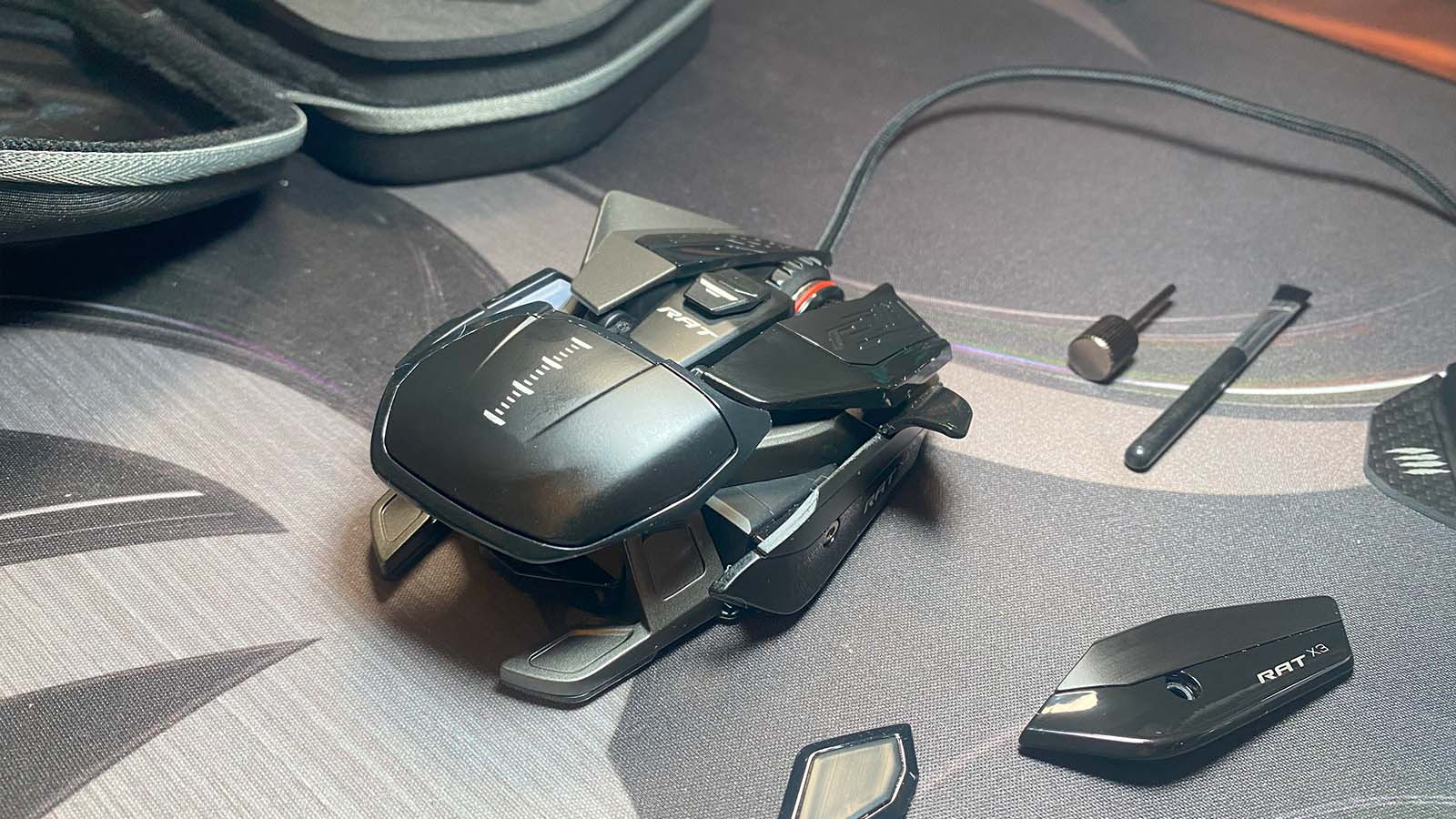
Those of us who have been around for a while will recognise Mad Catz as the brand that always had those mice that were just a little bit out there when it came to design—that almost transformer-like look that they like to call the “exoframe.” Well, the Rat Pro X3 is rocking that look more. Almost every part of the mouse can be removed and swapped out for a different piece to suit your hand and how you use it. Plus, there are even more extra bits in the box that just keep you drooling.

Let me break down exactly what comes in the box for you:
- The Mad Catz Rat Pro X3.
- A moulded hard shell carry case for the Rat Pro X3, that even has a wrap-around space for the cable.
- A tiny screwdriver.
- A tiny cleaning brush.
- Useless manuals (that I actually needed).
- A sticker pack.
- Two different scroll wheels.
- PTFE feet in case the carbon feet are too ‘glidey’ for you.
- Two different palm wrests.
- A different right side piece that extends the thumb buttons slightly further.
- A different left side piece that adds more side skirt than you ever need.
- Another left side piece that adds a rest spot for your right ring finger.
- More cool than Will Smith in the Fresh Prince of Bel-Air.
Unboxing this mouse had me gushing, and I hadn’t even used it yet.
Of course, with all this extra body kit just lying before me, I had to install all the parts I thought would make this mouse optimal for my usage before I even plugged the thing in. I kept the carbon feet, traded out the standard scroll wheel for a slightly softer one, and added the left-side piece with the little ring finger rest spot. I then gave it a dusting with the tiny cleaning brush and oogled at it for another 30 minutes.

Once I finally had the thing plugged in, my first task was to open up the software and have a squiz at what this bad rat had under the hood. Of course, all eight of the buttons are reprogrammable. The software offers a selection of shortcuts, like opening up the task manager or zooming in and out, as well as custom macros or basic key presses. You can store up to 4 different DPI levels per profile on the mouse, and they can each be within the range of 50 and 16000 at 50 DPI increments. Your polling rate is also something you can change, starting from 125Hz and going all the way up to an awesome 3000Hz, and then there are two extra features that I haven’t come across before.
The first is called Angle Snap. The idea behind this feature is that the software will attempt to smooth out snappy or jittery movement on the mouse. This can be quite useful when you’re doing creative things like digital painting with the mouse.
The second is called Precision Aim. I really enjoyed this feature. By default, it’s attached to one of the right-side thumb buttons, and when you press that button, it substantially lowers the DPI, giving you more precise control over the cursor. This is especially useful in shooting games when using weapons like a sniper rifle, and I even found a use for it in League of Legends for targeting creeps and/or champions when they were all bundled up.

Another awesome feature of the Mad Catz Rat Pro X3 that I’ve been pining for on the last few mice that have passed my mousepad is an easy profile switch button. Just flip the mouse over, and there it is. Press it, and you can swap between 10 different profiles on the mouse, and a fancy digital screen will show you which profile you’re using.
In both gaming and general work use, I found the mouse easy to use and very silky when moving it across my mousepad. Technically, there were no areas where I could really find any fault. The only gripes I have with the Mad Catz Rat Pro X3 are more because of personal preference.
For one, I’ve become so accustomed to a wireless mouse now that I just don’t know where to put the cable for a wired one. While the cable on the Rat Pro X3 is generally pretty light, it’s always connected, and it feels like a loose string on my shirt that I want to rip off.
Secondly, this mouse needs to know who’s in control. While I prefer to use a finger grip, the exoframe design wants you to go all in. Full palm, up, in, and around the whole mouse. I’m not saying that a finger or claw grip won’t work with this mouse, but it was definitely more comfortable to hold and easier to control when I had my whole hand on the mouse.
Again, this is just how I prefer to use my mouse, and it is technically not necessarily a fault of the Mad Catz Rat Pro X3.

With all this junk in the trunk, though, you’d expect to have quite the price tag, and you’d be right. Hovering at around R2,800, the Mad Catz Rat Pro X3 is definitely not going to go easy on your wallet, but a cool factor on a level like this never will. Over and above all that cool, too, is an array of features you can’t easily find on mice from the other common brands. All you need to do now is convince your partner that you’ll be eating no-name brand noodles for a month or two.