Back in the early days of WoW, when I still used to play it by bumming the monthly subscription off of my dad’s credit card, a mouse like the Razer Naga V2 Pro would’ve been the mouse of my dreams, however, I have since gotten old and grey and I no longer have enough time to truly spend on MMOs as I have beauty sleep to get to.
So when the Naga V2 landed up on my desk for review, I was certain that I wouldn’t enjoy it at all. In fact, as Arielle can attest, my now perfect mouse has a maximum of four buttons because why on earth would you need seventeen?!
After spending some time with this low-rider of a mouse on my desk though, I’m beginning to question my own certainty. This mouse is great and here’s why:
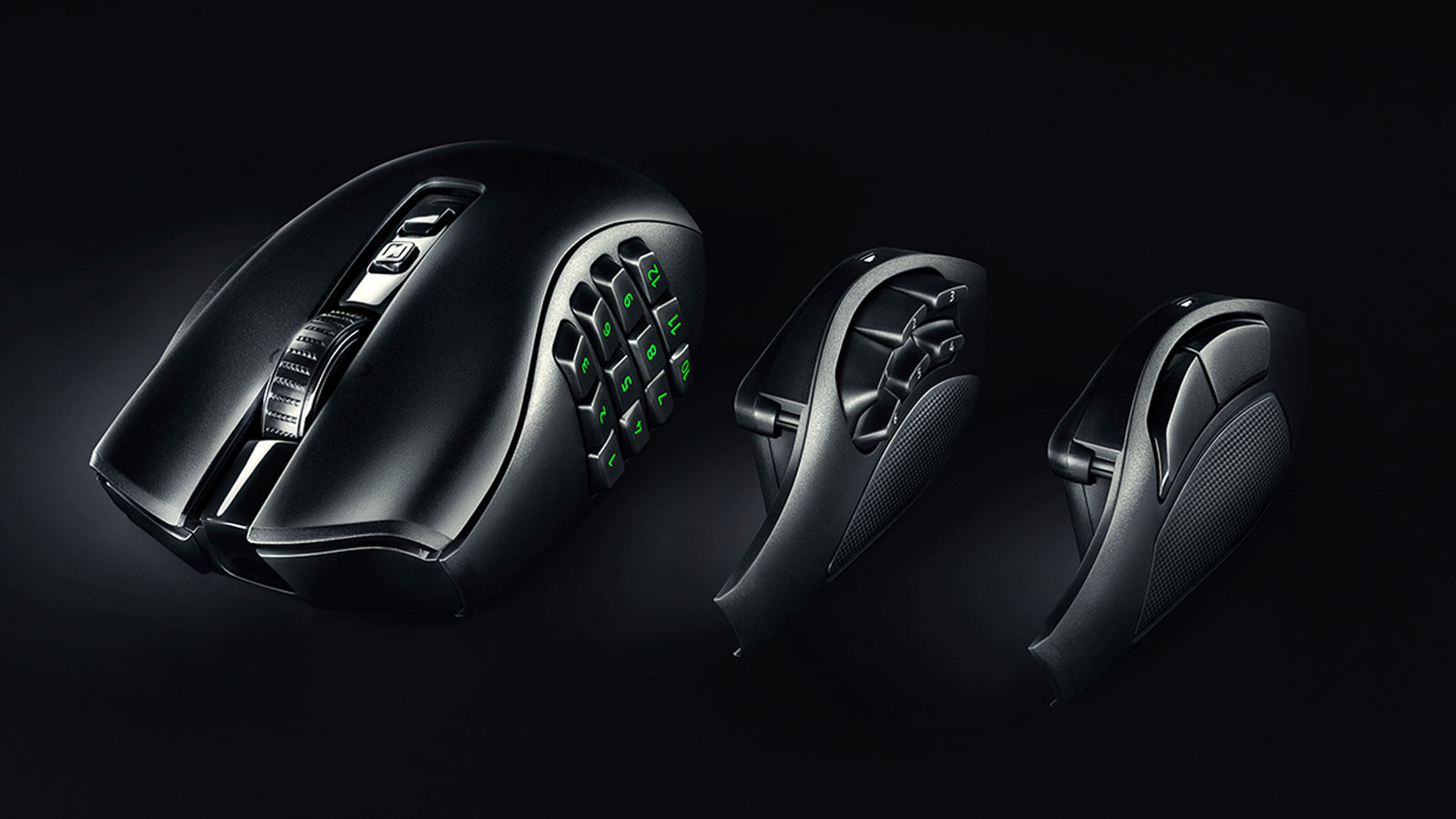
First of all, while the Naga is sold as an MMO Gaming mouse, it does come with a removable side plate that allows you to actually choose the number of side buttons you want. The V2 comes with 12, 6 and 2 button plates and they are held on magnetically so you can easily just pop them off and on again depending on the task you’re about to smash.

Razer has done this so as to not isolate the rest of us who feel they want to use the Naga but are not necessarily only MMO players. The other side plates are designed for other games like RPGs or first-person shooters, although with a hefty weight of 134g, those headshots might not come as quickly as you’d like them to. I really like these removable side plates, it adds to the customisability of the mouse to really make it your own.
Secondly, the mouse comes with both Bluetooth and a Wireless 2.4ghz receiver, so you can easily swap between different machines if you are perhaps running both a laptop and a desktop on the table. I found this super handy because it meant that I could have my mouse at home, set up for whichever game I was about to play, but if I had to leave and work outside, I could just bring my Naga along with me. The other neat thing is that I could assign all my work functions to the extra buttons on the side as well, meaning I had a whole free hand to drink coffee while the other did all the hard work. It might not be something everyone looks at, but the ability to stick with one comfortable mouse through both my work day and my gaming nights is an awesome feature to have. Plus, if your work machine doesn’t have Bluetooth, bringing the little dongle along with you isn’t such a train wreck either as it tucks neatly underneath the side plate.
Speaking of comfort, the Razer Naga is very comfortable to use. Granted, it is a right-hand-only mouse and I will admit I struggled to find the right-click for about a day because the shape allows three fingers to sit facing upwards, so I kept trying to right-click with my right ring finger, but after a bit of practice the more casual grip was a welcome feeling.

If you bolt on the Razer Synapse 3 software package you unlock a whole new realm of customisation, and I don’t mean new as in changing the RGB logo to Barbie Girl Pink. The Razer Naga V2 Pro has the ability to have up to 5 different scroll wheel profiles on it at one time, and each one can be customised to your liking. The amount of steps in the scroll and the tension required can be changed and even the feedback can be adjusted to allow for the perfect scrolling feel. Enjoy that free-wheel feeling? No problem. Perhaps you enjoy a bit of tug-of-war against your scroll wheel, easily doable. It may sound like a gimmick, but having the ability to change the way my wheel scrolls between gaming and browsing just added to the whole experience, and being able to make it exactly how I wanted was the cheesecake to my mouse party.
The software also allows you to edit the RGB, which is quite minimal on this mouse. The Razer logo under your palm is the only real section of lights. The 12-button side plate is also customisable, but only if you have it on the mouse.
You can also meddle with the power-saving settings to squeeze an extra hour or two out of the mouse, should you really need to. The spec sheet says you should be getting around 150 hours on a single charge, but I’ve had it running for over a week now and I’ve managed to just get it down to 15% as of writing this very sentence. Quite impressive to say the least. It does have the socket at the bottom for a charging puck for wireless charging as well, so you could pop it onto a dock when you’re not using it so it never runs out of battery, like, ever.

No matter the game I was playing or the Excel spreadsheet I was working on, the Razer Naga gave me the ability to create a profile for each and had the right amount of side buttons to use every time. It runs like melted butter across the mousepad and its solid build and extra weight meant it had a good hand feel as well. It was very responsive thanks to the 30,000 DPI optical sensor and each of the buttons has a good click to them, both on the side plate and on the actual mouse.
Now you’re probably thinking to yourself, a mouse with this many features must surely cost a lot, and you would be spot on there. Probably the only downside I can think of to this mouse is the extreme amount of money you would be spending to get one. You’ll be adding this to your cart at a whopping R3,800. Just typing that out makes my wallet run and hide, and while I do really enjoy using this mouse and the absolute unit that it is, with its customizable everything, at the end of the whole thing, going back to my old mouse was not at all hard to do.
Yes, this mouse is amazing and while it’s more versatile than a piece of string in a scout master’s hands, there is probably a very specific market of people that will actually land up buying one, especially for that price tag.