I’ve said this before, and I will say it again in case you didn’t hear me. In this day and age, with the almost endless customizability of keyboards, the keyboard that each of us uses is quite personal. Whether it be for gaming, coding, writing, smacking zombies over the head or some other keyboard task, the feel of the keys, the feedback on the clicks, the size, the style, all of this can be done in the way that’s just right for you. So when it comes to reviewing a new keyboard, it’s a little tough, to be honest, if it’s set up in a way that’s not really my personal style.
Just so you know where I’m coming from, I prefer the clicky blue key variant with a low-profile keycap. I like the feedback they provide, from both the finger feel and the sound is loud enough to just be heard through whatever loud audio is pumping on my headphones. The low profile keys allow me to slide my fingers across the keys for writing quickly, and I feel like I get a more immediate response when gaming, as I have less distance to travel. My daily driver is my beloved Logitech G815. It’s exactly the right setup for me.
In fact, I tried typing this review on the G715, and I only got through the first paragraph before I got annoyed with my fingers catching on the taller keys. I’m not saying it’s a keyboard problem; I’m just trying to explain how personal keyboards are. Now, on to the G715.
The first thing you’ll notice is that it comes in a big box. I like that. I like hefty keyboards. I don’t need my keyboard to weigh 0.0005mg. I mean it’s supposed to sit where I put it and do the thing it was made to do. Yes, I get that a wireless keyboard should be more portable, especially one with bluetooth that you will be taking back and forth between your gaming PC and your media server in the lounge. But when in use, I like my keyboard to sit like a good dog.

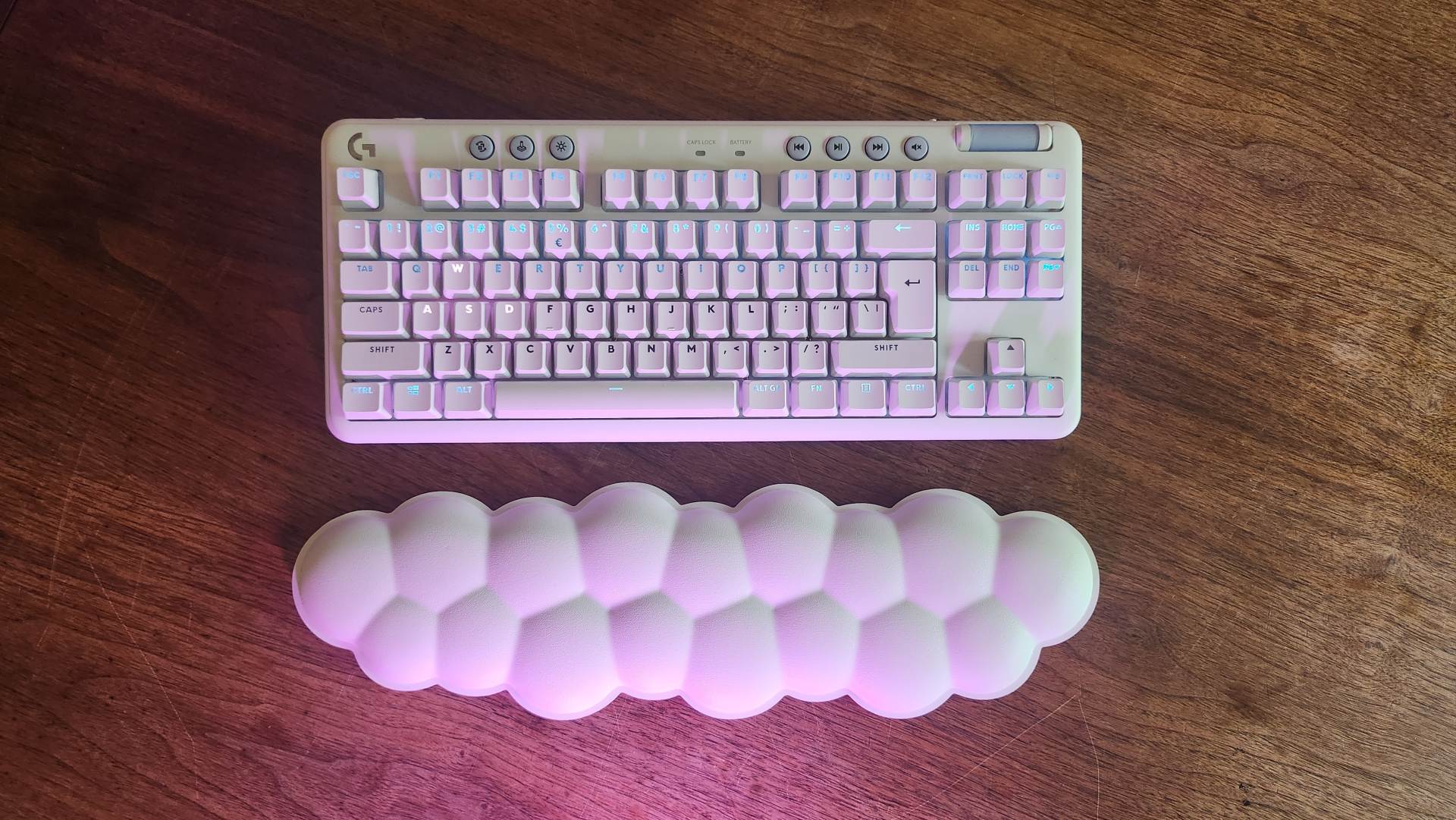
Obviously, you’ll have picked out the G715 because you’re looking for a white keyboard. Again, not for me as I can only see this keyboard getting way too dirty too quickly, but the G715 is stunning. I do stare at white builds online daily and wish I could gather the courage to someday build one, but I always back out thinking about how grimy the build will look if I don’t put in the effort to keep it sparkly. Pair this beautifully white keyboard with the even more magical cloud-shaped wrist rest and you’ve got such an amazing-looking setup right in the palm of your hands. And let me tell you, this wrist rest is comfy as heck, in fact I’m currently looking how to upgrade from my current one (not in white,, but I can imagine a dark and stormy cloud would look just as fantastic).
The G715 is compatible with GHub and you can get super crafty with your RGB lighting, but the default falling snow effect and colours just suit the keyboard so well that I didn’t bother touching them.

As mentioned above, the G715 comes standard with Brown GX Tactile keys and Double-shot PBT standard profile key-caps. The Brown keys are nothing to laugh at; they feel squishy and give a decent amount of push-back, kind of like… pudding? They are very nice keys, just not for me. The keycaps are very pretty and have a matte finish on them, which feels good on the fingers. It’s not that I didn’t enjoy using the keyboard, I just have a type, ok?
One neat feature is that the faceplate of the keyboard is magnetic. This means you can easily pop it off, get in with some elbow grease, clean it all up and pop it back on. I like that this has been added, considering getting the keyboard dirty is my biggest worry for the G715. Having this faceplate easily removable also adds a hint of customisation. I haven’t seen any other coloured faceplates on sale (yet?), but if I were inclined to spray it any different colour, I could easily do so without having to fuss about taking the whole thing apart.
Overall, the G715 is a premium TKL keyboard that ticks many boxes. It’s wireless, so you can easily take it from your PC to a Bluetooth device elsewhere (although no multi-device like the G915). It’s stunning to look at, and it’s a great gaming keyboard. It’s just not my great gaming keyboard. I know I can always change the keys and keycaps later on, but then I might as well just get a keyboard with the thing I like from the get-go. If Brown Keys and pretty white setups are your thing, this is the keyboard for you, don’t look elsewhere; just look here. If not, well, that’s cool too.