
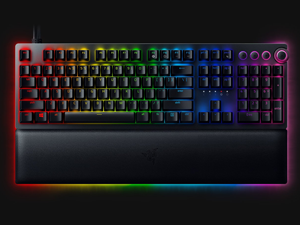
Mechanical keyboards have been my favourite rabbit hole for the past few years. The mechanical keyboard space is a hobbyist’s dream and a wallet’s nightmare, and perhaps the best part of it is just how personalised a simple thing like a keyboard is capable of becoming. You only need to put in the work.
On the mainstream side of things, the popular brands have taken notice – and you can best bet they’ve lined up with the reasons to purchase their particular mechanical keyboard. Nobody has done that better than Razer, with specifically the premium Huntsman line of keyboards. I’ve previously reviewed the Huntsman Mini and Huntsman Tournament Edition, and now in 2021, it’s time for me to review the new V2 Analog model. Let’s go through some of the new features.
The Huntsman V2 Analog is a full-size mechanical keyboard with linear optical switches. It gets the “Analog” moniker for a feature that not many keyboard designers have been brave enough to try – leveraging an optical switch to customise the switch itself. More on this in a bit.
The V2 Analog touts (frustratingly) non-detachable dual USB Type C + Type A cables for the keyboard itself and a USB 3.0 pass-through respectively, and there’s also a Type C to Type A adapter if your motherboard is from 1965. Please note these are USB 3.0, so connecting them to a USB 2.0 will cause issues. Also included in the box is a faux leatherette plush wrist rest with its very own RGB strip. I didn’t hate the comfort factor, but I didn’t love how easily it detached from the base of the keyboard.
The keyboard itself is gorgeous and feels delightful in the hand, with a height-adjustable, low-profile, aluminium base, and doubleshot-PBT keycaps completing the look. I’m not the biggest fan of the backlighting, but I’ll accept the trade-off for the premium feel. There are additional media keys including a volume knob, which is just an unnecessary flex but I suppose if you’re paying for it, flaunt it.
Cool, that’s the back of the box stuff out of the way, let’s talk about analog – or analogue, for everybody outside of the US – switches.

I love analogue switches. Because the switch is powered by light, every unit of movement along a switch can correlate to a unit movement registered by simply measuring the light. In theory, this is a game-changer for analogue keyboards – suddenly racing games become viable with only a keyboard, for example. No controller or expensive driving setup needed.
The Huntsman V2 Analog doesn’t do it like that. Not exactly, anyway. I’ll explain.
Yes, there’s analogue functionality available. But getting analogue functionality in a keyboard is actually very complicated because the device has to trick your PC into thinking your keyboard is a game controller. Even Windows refuses to believe your keyboard is that good. To solve this problem, Razer’s version of analogue functionality makes use of some creative implementation.
With Razer’s Synapse software, you can set custom actuation and reset points along the key press. This means you can set the exact point on a keypress that the “press” registers, and then the exact point to reset that. This lets you create your preferred key feel. A criticism I had of the Huntsman Tournament Edition was its high actuation point – the Huntsman V2 fixes that with this feature.
Razer takes it a step further by also allowing the setting of two possible inputs per switch. Now granted, multi-layer keyboard configuration tools do exist (typically using Fn + some preset combination), but this just hits different. You can configure, for example, a half-press of the W key to output “w” and a full-press to output “W”. There are probably better uses than this, but you get the concept.
Let me repeat myself – I love the concept of analogue switches. Which means I spent my time thoroughly enamoured with this keyboard. There’s just one gigantic green snake logo-sized catch, and it’s the price. This makes it a tough one to recommend because on paper, I truly think this is the best linear keyboard from a mainstream peripherals brand. On the other hand, that amount of money starts getting me wondering what I could get in the custom keyboard space, and that’s a dangerous thought because the answer is a lot.
Still, I can’t for a second take away from the quality on offer here.